You text customers all day, take a handful of calls, and you don't want to pay for a full productivity suite just to unlock a business number. That's a real category — and the tools built for it range from "basically a second SIM" to "mini call center." Here's how to pick without overbuying.
What solo texters actually need
Before comparing logos, get honest about the job. Most solo operators need five things:
- A real US number that isn't tied to your personal cell
- SMS that's 10DLC-registered so messages actually deliver
- Threaded conversations across desktop and phone
- Basic call handling: voicemail, business-hours greeting, maybe a forward
- Auto-replies for missed calls and after-hours texts
If a tool can't do those five cleanly, it's not a business phone — it's a hobby phone. And if you're paying for stuff you'll never touch (video conferencing, contact center analytics, CRM-of-the-month), you're overbuying.
One note that trips people up: in 2024 carriers started filtering unregistered A2P traffic hard. If your provider hasn't walked you through 10DLC brand and campaign registration, your texts are getting throttled or dropped silently. We covered the mechanics in why business texts aren't going through — worth reading before you commit to any platform.
Google Voice (personal + Workspace)
The free, personal Google Voice number is what most solos start with. It works. It's free. And it has real limits the moment your business gets serious:
- No 10DLC registration. Personal Google Voice runs on consumer SMS rails. Carriers increasingly filter business-pattern texts from these numbers.
- No auto-reply, no business hours, no shared inbox if you ever bring on help.
- Terms of service technically restrict commercial use on the free tier.
The Workspace version (Voice for Business) fixes some of that, but you're now paying for Workspace seats plus a Voice add-on. If you don't already live in Gmail/Drive/Docs for work, it's a lot of overhead for a phone number.
Pick it when: you're brand new, texting volume is low, and you already pay for Workspace anyway.
OpenPhone
OpenPhone is the default recommendation for solo operators right now, and it's earned it. Clean apps, decent SMS threading, snippets, auto-replies, and a real business number on a reasonable per-user price. Their 10DLC flow is built-in.
Where it gets thin: if you want to grow into anything resembling a small team with ring groups, call queues, or IVR menus, you'll outgrow the lower tiers fast. The per-seat pricing also climbs once you add a second person and an extra number.
Pick it when: you're solo, you'll stay solo or near-solo, and texting is the primary channel.
Grasshopper
Grasshopper is the OG "virtual phone" for small operators. It's been around forever and the value prop is simple: a business number, extensions, voicemail-to-email, and a mobile app. Calling-first DNA.
The weakness is SMS. Texting on Grasshopper feels bolted-on compared to OpenPhone, and historically their A2P support has been less of a focus. If texting is 80% of your customer contact, that matters.
Pick it when: you take more calls than texts, you want extensions that sound bigger than you are, and you don't need rich messaging features.
The "just get a second cell line" option
Don't dismiss it. A second SIM or a cheap business cell plan gives you a real number, native iMessage/SMS, and zero learning curve. The trade-offs:
- No desktop texting (or only via clunky workarounds)
- No team handoff if you ever hire
- No 10DLC, so high-volume sending will get filtered
- Your number is tied to a device, which complicates porting later
For very low volume — under a few dozen texts a day, mostly one-to-one — this is genuinely fine.
Where a dedicated SMB platform fits
The gap in the market: solo and small-team operators who want SMS-first functionality, a real DID (or a vanity toll-free), proper 10DLC handling, and voice features they can grow into without re-platforming. That's the slot Text N Dial sits in.
Concretely, the things that matter when you cross out of "solo with a second cell" territory:
- 10DLC brand and campaign registration handled for you, not a self-serve form you have to interpret
- Two-way SMS with templates, scheduled sends, and opt-out handling built into the thread
- A phone system underneath in case you ever add ring groups, business hours routing, or a shared voicemail
- Per-number SMS toggles so you can run separate business lines without separate accounts
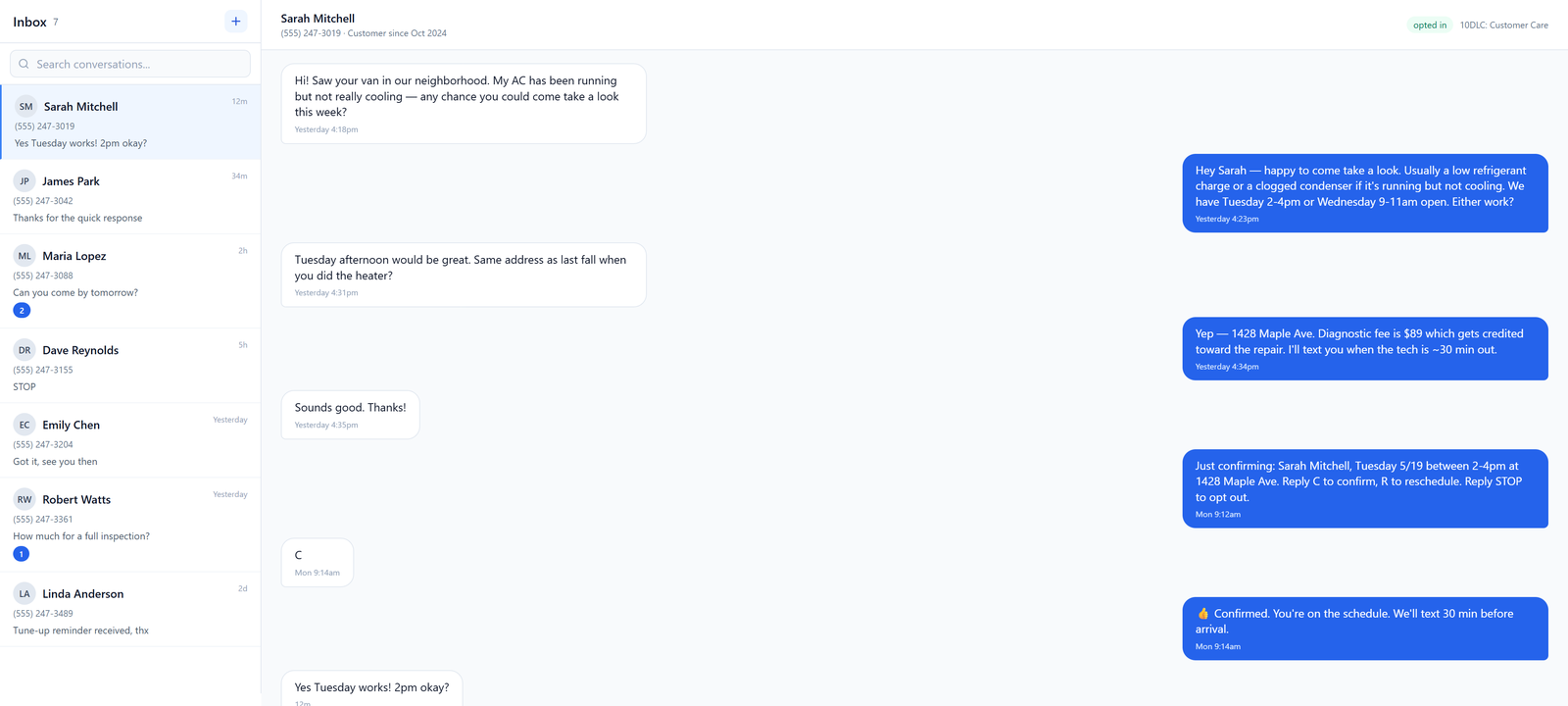
The point isn't that every solo operator needs all of this on day one. It's that switching platforms once you outgrow OpenPhone or Grasshopper is painful — you have to port the number, retrain your habits, and re-register your 10DLC campaign with the new provider. Picking a platform with headroom saves that migration later.
Quick comparison
| Tool | Best for | SMS strength | Voice strength | 10DLC handled |
|---|---|---|---|---|
| Google Voice (free) | Pre-business / very light use | Weak | Basic | No |
| Google Voice (Workspace) | Already on Workspace | OK | OK | Partial |
| OpenPhone | Solo, texting-heavy | Strong | Light | Yes |
| Grasshopper | Calling-first solos | Light | Strong | Limited |
| Second cell line | Sub-30 texts/day | Native, but no compliance | Strong | No |
| Text N Dial | Solo growing into small team | Strong | Strong, grows with you | Yes |
What to do next
Make two decisions before you sign up for anything:
- Estimate your weekly text volume. Under 50/week, almost anything works. Over 200/week, 10DLC registration is non-negotiable — and that rules out the free options.
- Decide if you'll ever add a second person. If yes, pick a platform with shared inboxes and basic voice routing now. Re-porting a number later costs you days of downtime.
If you want to see what a grown-up SMB phone setup costs without the per-seat tax, our pricing page lays it out. And if you've already got a number you like, we cover number porting without you having to start over.