Your CRM started blocking outbound texts because your opt-out rate hit 10%. Someone on the team floated the idea of buying a handful of new numbers and spreading the sends across them. Don't. That's the fastest way to turn a throttling problem into a full shutdown.
Here's what's actually happening, why splitting traffic makes it worse, and the checklist that brings opt-outs back down to a number carriers are happy with.
Why your texts are getting blocked
When you send business texts in the US, every number you use has to be registered under a system the carriers run together — it's called 10DLC, which is short for "10-digit long code" (a normal-looking phone number used for business messaging). As part of that registration, the carriers (Verizon, AT&T, T-Mobile) watch how your recipients react. The single biggest signal they watch is the opt-out rate: the percentage of people who reply STOP or otherwise tell the carrier they don't want to hear from you.
The unofficial line in the sand is around 3%. Once you cross it, you start getting throttled — fewer of your messages go through. Push higher and the carrier will block the campaign entirely, sometimes the whole brand. You're at 10%. That's why your CRM is screaming.
This isn't a CRM problem. Your CRM is the messenger. The carriers made the decision.
Why rotating numbers makes it worse
The move you're considering — spreading sends across multiple numbers to dilute the opt-out rate per number — has a name in the industry: snowshoeing. Spam filters were built specifically to catch it, because that's what spammers do.
Here's what carriers see when you snowshoe:
- A brand registered for one use case suddenly lighting up five numbers with identical content
- Each number with low volume individually but high aggregate
- Opt-outs distributed but still trending up across the brand
Carrier filters don't grade each number in isolation. They roll the metrics up to the brand — the registered business entity behind all those numbers. Your opt-out rate follows you. Worse, the pattern itself (many numbers, similar content, evasion-looking behavior) gets you flagged faster than the original throttling would have.
If you want to read more about how carriers approve and police business numbers, we wrote up the carrier SMS approval requirements separately.
What actually drives opt-outs up
In rough order of how often we see them:
- The list is stale or never properly opted in. Old leads, scraped data, contacts who said yes two years ago for one thing and are now getting something else.
- Sending too often. Three texts a week to the same person, every week, will torch any list.
- The message isn't what they signed up for. They opted in for appointment reminders; you're sending promos. They opted in for order updates; you're sending a newsletter.
- No clear sender identity. The recipient sees a number, can't remember who you are, hits STOP as a reflex.
- Bad timing. 7am Saturday. 9pm Wednesday. Stuff that feels rude.
Notice none of those are fixed by adding more numbers.
The checklist to bring opt-outs back under 3%
1. Stop sending to anyone you can't prove opted in
Pull your list and segment by consent source. If you can't point to where and when each contact agreed to receive texts from you — specifically texts, specifically from your business — quarantine them. Sending to unconsented contacts is also the fastest way to land a TCPA lawsuit, and the 2026 TCPA changes tighten that further.
While you're at it, scrub the list for landlines, disconnected numbers, and known complainers. We have a walkthrough on cleaning a phone list before an SMS blast if you need a process.
2. Fix the opt-in itself
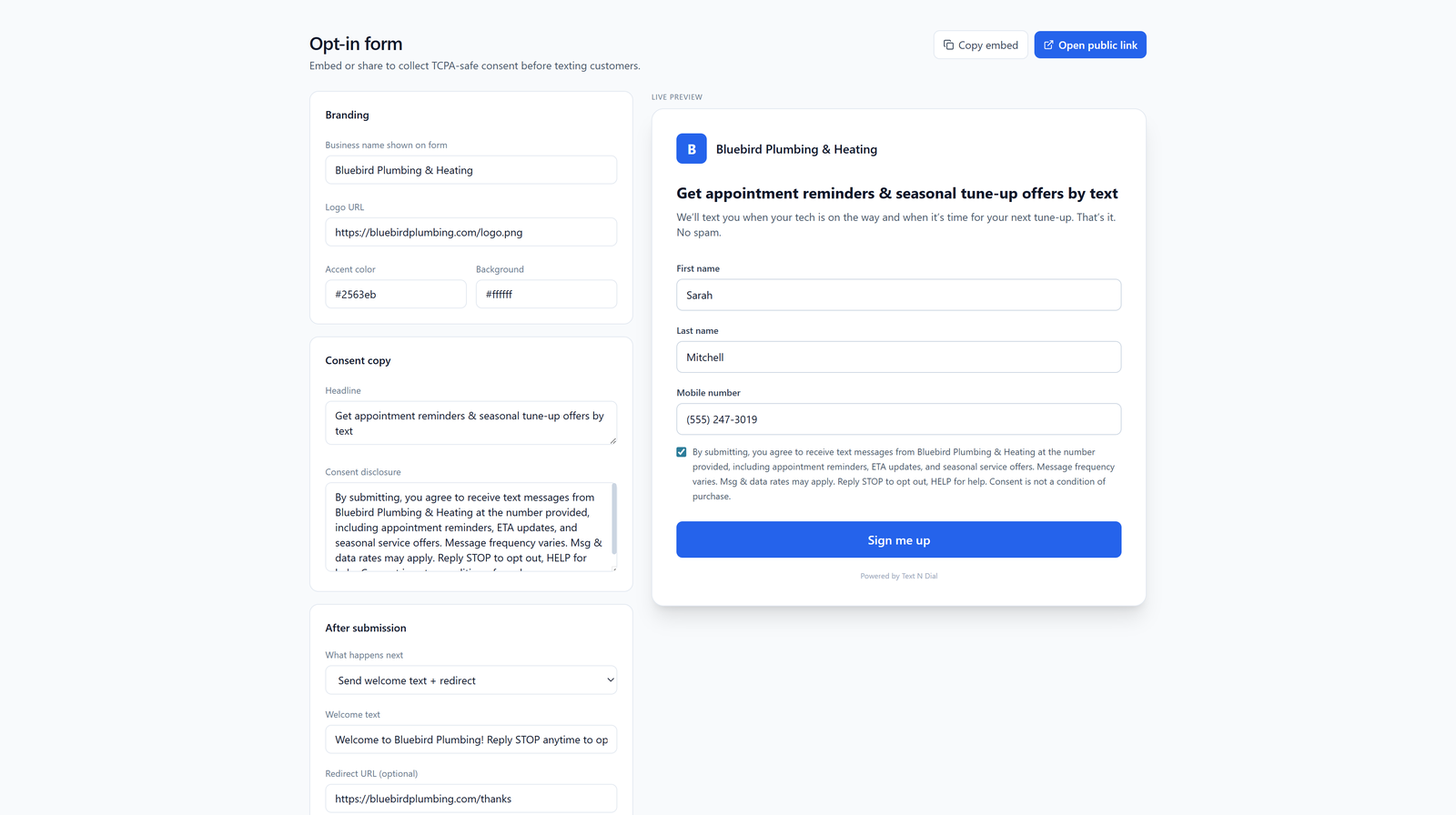
The opt-in form should say, in plain English, exactly what the person is signing up for, how often, and from whom. "Get text updates" is too vague. "Get 2–4 texts/month from Joe's HVAC about appointment reminders and seasonal service deals" sets the right expectation. People who know what they're getting don't hit STOP.
3. Cut send frequency in half, then evaluate
If you've been sending twice a week, drop to once. If once, drop to every other week. Watch the opt-out rate on the next two or three sends. This alone often takes a 10% opt-out rate down to 2–3%.
4. Segment so the message matches the audience
A promo for first-time customers shouldn't go to people who bought yesterday. An upsell shouldn't go to people who haven't bought yet. The more relevant the message, the lower the opt-out rate — it's that direct.
5. Identify yourself in every message
First line of every text: who you are. "Joe's HVAC here —" costs you ten characters and saves you opt-outs from people who forgot they signed up.
6. Honor STOP instantly and quietly
Don't send a "sorry to see you go" follow-up. Don't try to re-engage three months later from a different number. The carriers track this, and the registered brand is on the hook.
What to do this week
In order:
- Today: Pause the campaign that's getting throttled. Every additional send at a 10% opt-out rate digs the hole deeper.
- This week: Pull the list, segment by consent source, and quarantine anything you can't verify.
- Next send: Cut frequency, tighten the audience, and lead the message with your business name.
- Ongoing: Watch your opt-out rate per send. If it ticks above 2%, change something before the carriers do it for you.
If you've done all that and your CRM is still throttling, the problem may be on the platform side — old registration, the wrong use case on file, or a sending profile the carriers have soured on. Sometimes a clean rebuild on a business SMS setup built for compliance is faster than fighting through a tarnished one. But try the checklist first. Most teams get back under the threshold without changing platforms.
What you don't want to do is buy more numbers and hope the math hides the problem. The carriers are looking for exactly that move.