Most local businesses are sitting on a goldmine they never tap: the customers who already walk in the door. You don't need a fancy loyalty program to bring them back on a slow Tuesday — you need their phone number, their permission, and a reason to text them. The trick is getting all three without annoying them into hitting STOP after the first message.
Here's how to start texting your customers the right way: collect opt-ins that hold up legally, write the boring-but-required consent language correctly, and send on a cadence that fills slow shifts instead of emptying your list.
Why most local SMS programs fail before they start
The failure pattern is almost always the same. A shop owner gets excited, dumps every phone number from their point-of-sale system into a texting app, blasts a 20% off coupon, and gets a wave of complaints and unsubscribes. Within a month, their phone numbers are flagged by carriers, messages stop getting through, and they decide "SMS doesn't work."
It does work. But texting a customer is not the same as emailing them. The rules are stricter, the tolerance for spam is lower, and a single bad send can poison the well for months. Three things separate the shops that get great results from the ones that quit:
- They only text people who clearly asked to be texted.
- They send messages people actually want.
- They send them rarely enough that the next one still feels like a treat.
The rest of this guide is how to do those three things.
Collect opt-ins at the register (without slowing the line)
The single best moment to capture a phone number is when someone is already paying. They're standing still, they like you enough to be buying something, and the ask feels natural. Miss that moment and you'll spend the next year trying to grow your list with web forms that nobody fills out.
What actually works at checkout
- A printed QR code at the register that opens a short sign-up form. "Scan to get $5 off your next visit."
- A keyword-to-number sign up. "Text PIZZA to 555-1234 for $5 off." The customer texts in, you reply with a confirmation and the coupon.
- A tablet or printed card with three fields max: phone, first name, and a checkbox.
The incentive matters more than the channel. "Sign up for updates" gets ignored. "$5 off today" or "free side with your next order" gets scanned. Make it immediate and tangible — something they can use on the order they're paying for right now, or on their next visit within 30 days.
What to never do
Don't copy numbers out of your point-of-sale, your reservation book, or your online order system and call that a list. A customer giving you their number to confirm a haircut appointment did not give you permission to text them marketing. That's the fastest way to get complaints, fines, and your number shut off. There's more on cleaning lists the right way in our list hygiene guide before any blast.
The consent language you actually need
This is the part most owners skip and later regret. The federal rules (TCPA) and the carrier rules (the 10DLC registration program for business texting on standard 10-digit numbers) both require that your opt-in form spell certain things out clearly. Skip them and you're exposed to fines that start in the four figures per message and class-action lawsuits that get much, much bigger.
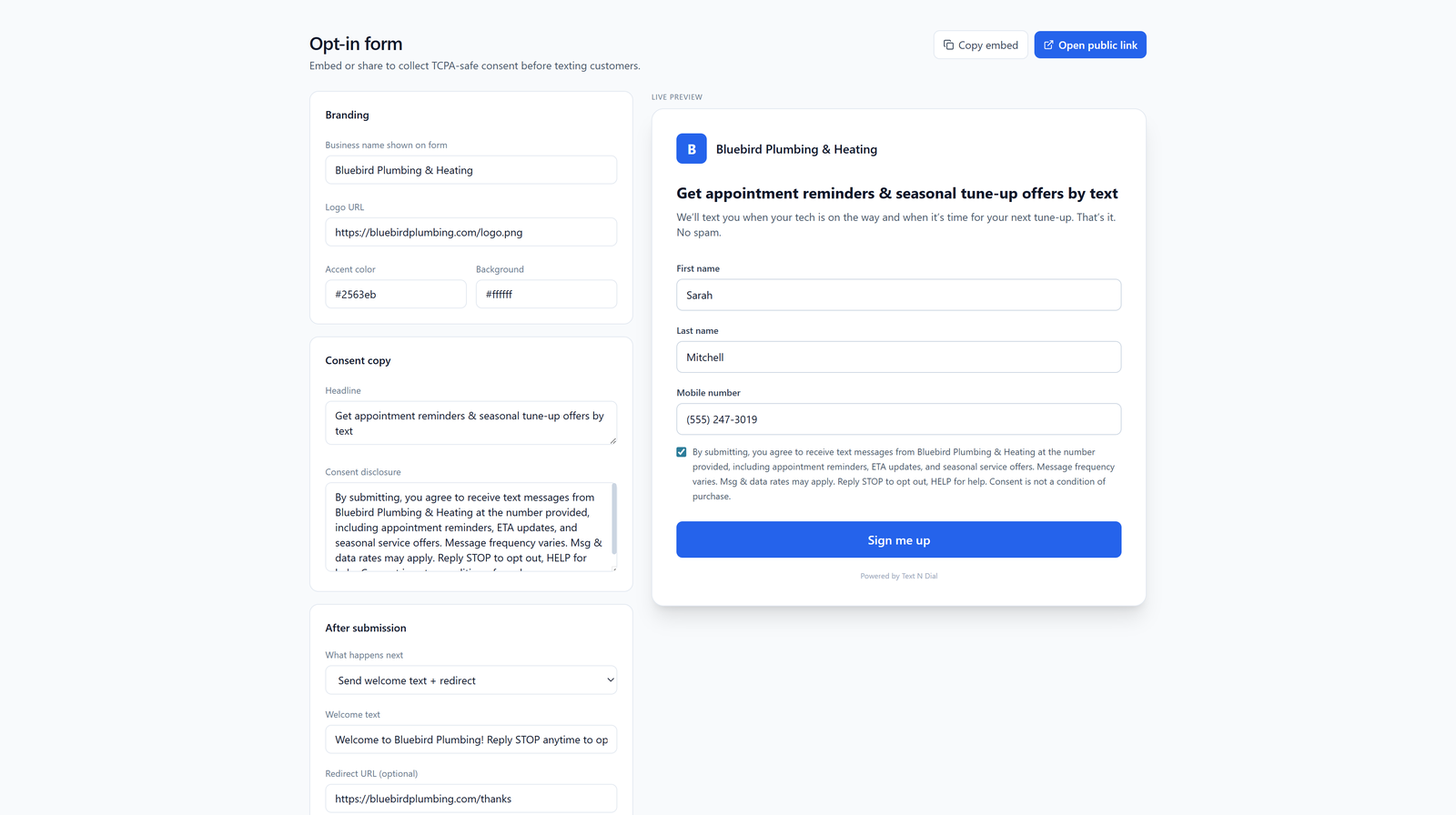
Your sign-up form — whether it's a QR landing page, a tablet, or a printed card — needs to say, in plain English near the phone number field:
- Who is texting them. Your business name.
- What kind of messages. "Promotional offers and updates."
- How often, roughly. "Up to 4 messages per month."
- That message and data rates may apply.
- How to stop. "Reply STOP to unsubscribe, HELP for help."
- A link to your terms and privacy policy.
And critically: the checkbox to agree cannot be pre-checked. The customer has to actively tick it.
On the texting side, your system needs to automatically handle the words STOP, UNSUBSCRIBE, CANCEL, END, and QUIT — removing that person from your list immediately and sending a confirmation. It also needs to respond to HELP with your business name and contact info. Most reputable texting platforms do this automatically; if yours doesn't, switch. For more on the legal landscape heading into next year, we wrote up what's changing in TCPA enforcement.
Your first message: the welcome text
The moment someone opts in, send one automatic text. This is the most important message you'll ever send them, because it sets the tone for everything that follows.
A good welcome text looks like this:
Thanks for joining Tony's Pizza texts!
Here's your $5 off code: WELCOME5.
Use it on your next order. We send ~4
texts/month. Reply STOP to opt out,
HELP for help. Msg&data rates apply.
That one message confirms the opt-in, delivers the incentive immediately, sets expectations on frequency, and includes the required opt-out language. Done.
A cadence that keeps people subscribed
The quickest way to torch your list is to text too often or text about things people don't care about. The shops with the lowest opt-out rates follow a simple rule: every text should either save the customer money, save them time, or tell them something they genuinely want to know.
Here's a cadence that works for most local businesses:
- Slow-day specials: one text, the morning of, with a same-day offer. "Tuesdays are slow — show this text for a free drink with any entrée today only."
- Back-in-stock or new arrival: when something popular comes back, text the people who've bought it before, not your whole list.
- Appointment reminders and confirmations: these are transactional, expected, and have near-zero opt-out rates.
- Seasonal or event-based: "We're open late this Friday for the game," "Mother's Day pre-orders close Sunday."
Four messages a month is a reasonable ceiling for most shops. Some weeks zero, busy weeks two. If you can't think of a reason to send that passes the "would I want this?" test, don't send it.
Watch your opt-out rate like it's your bank balance
Your opt-out rate after each send tells you everything. Under 1% means people are happy. 2–3% means you're pushing it. Anything north of 5% on a single message means that message was wrong — wrong audience, wrong offer, wrong time — and you should figure out why before sending again.
If you're already seeing high opt-outs and want to dig in, we wrote a troubleshooting guide on bringing opt-out rates down without resorting to rotating phone numbers (which carriers will catch and penalize anyway).
The other number to watch: replies. SMS is a two-way channel, and customers will text back with questions, complaints, and orders. If nobody at your shop is checking the inbox, you're leaving money on the table. Pick one person who owns it, even if that means checking it twice a day.
What to do next
If you're starting from zero, do these four things in order:
- Pick a platform that handles 10DLC registration (the carrier approval process for business texting), STOP/HELP automation, and consent record-keeping for you. Doing it yourself is not worth the risk.
- Build your opt-in flow — QR code, landing page, and the consent language above. Test it on your own phone before launching.
- Train your staff to mention it at checkout with a single sentence. "Want $5 off next time? Scan this."
- Send your first real promotion only after you have at least 50 opted-in subscribers. Smaller than that and you can't tell what's working.
The shops that win at SMS aren't the ones with the fanciest tools. They're the ones that respect the channel, ask permission properly, and only text when they have something worth saying. Do that and you'll have a list that actually shows up when you need them.