If you run a handyman, lawn care, cleaning, or detailing business out of your phone, you already know the trap. The first fifty jobs are easy — texts come in, you scribble an address on the calendar, you show up. Around job seventy-five, you stop being able to remember whether you told the Wilsons $180 or $220, or whether the Tuesday slot you offered was this Tuesday or next.
The problem isn't texting. Texting is the right channel — your customers actually read texts, and they reply fast. The problem is that your business memory now lives inside a phone thread you can't search, sorted by whoever messaged you most recently. Here's how to fix that without buying a $99/month field service app you'll abandon in three weeks.
The real failure mode: you can't answer your own questions
The moment you've outgrown raw SMS isn't when you miss a job. It's when you can't quickly answer:
- Did I quote this customer, or just chat with them?
- Did they confirm Tuesday or Wednesday?
- Did I promise a follow-up in two weeks?
- Did they pay the second half?
If you're scrolling threads to reconstruct what you said, you're already past the limit. You don't need a giant app. You need one place where the answer lives, and a habit that puts it there.
Step 1: Make the calendar the source of truth
The single highest-leverage habit, and it costs nothing: every confirmed job goes on the calendar the moment it's confirmed, with a structured title. Not "lawn." Not "Smith." Something like:
Smith — first cut — 200 Elm St — $140 — confirmed
Put the phone number and any quirks (gate code, dog in yard, slope on the side lawn) in the event description. Color-code tentative vs confirmed. Now when a customer texts you three weeks later asking what you charged, you search the calendar instead of scrolling a thread.
This one habit replaces about 80% of what a field service app gives you, and it takes ten seconds per job.
Status tags that pay for themselves
A prefix or emoji in the title tells you at a glance where the job stands:
Q —quoted, waiting on customerC —confirmedD —done, needs invoicingP —paid
Once a week, filter for Q — and D —. Those are the jobs leaking money.
Step 2: Treat SMS as the channel, not the file cabinet
Text is where you talk to customers. It is not where you store what was agreed. The fix is to make every text searchable somewhere that isn't your phone screen.
The easy version: forward your business texts to email, either by mirroring at the phone level or by using a business texting service that drops every conversation into a searchable inbox. Now "what did I tell the Hendersons about the driveway slope" is a search query, not a scroll.
If you're still texting customers from your personal cell number, that's a separate problem worth solving — your number ends up in random databases, and you can't hand off the business if you ever want to. A dedicated business number keeps the customer history separate from your life, and you can search it.
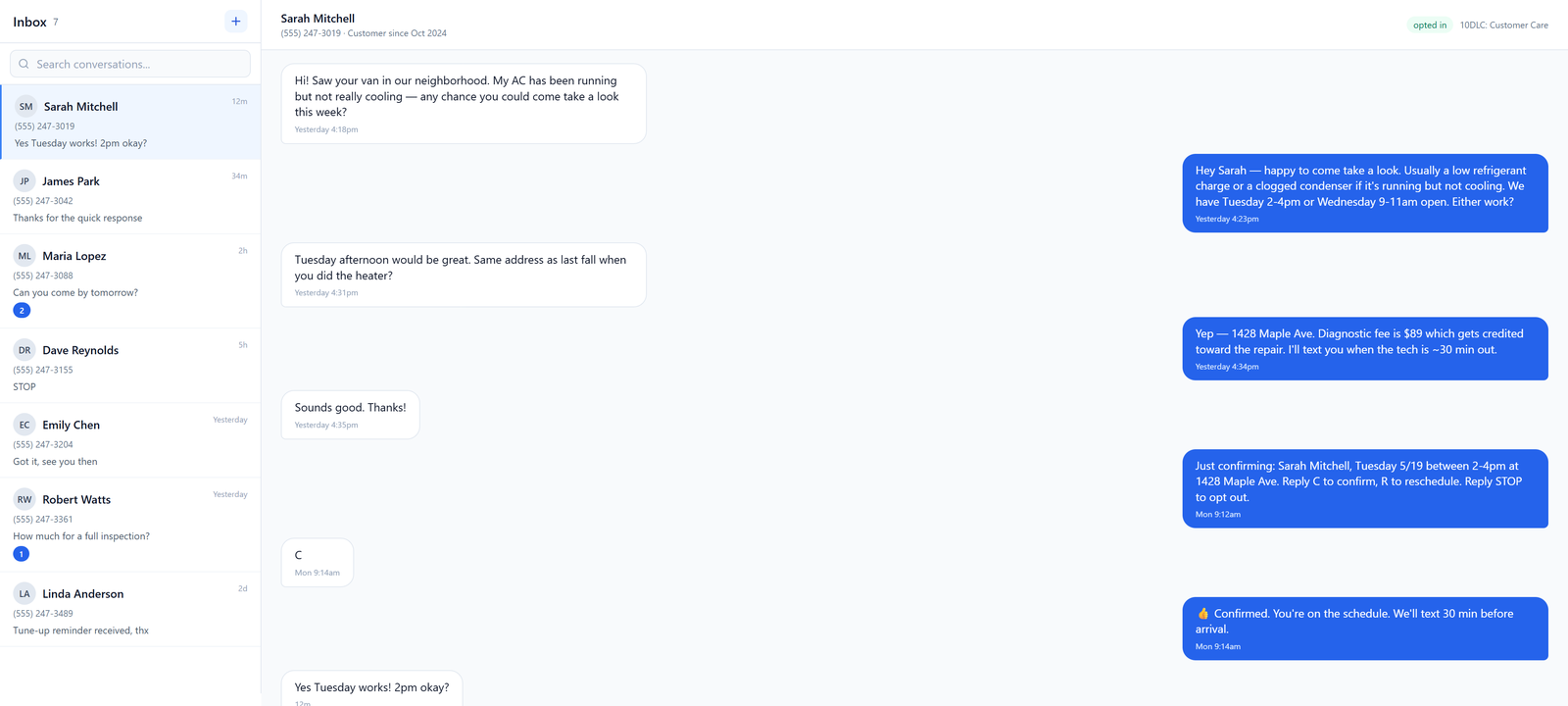
Step 3: Confirmations that actually confirm
A booking isn't confirmed because you said "see you Tuesday" and they thumbs-upped it. A booking is confirmed when the customer has the specifics in writing and you have a clean record of it. Send something like:
Hi Karen — confirming Tue Mar 12, 9–11am,
first cut at 200 Elm. $140, cash or Venmo.
Reply YES to confirm or call if anything changes.
Three things going on here: the date, the price, and an explicit ask for a reply. The reply is your paper trail. If they no-show, you have a YES in writing. If they push back on price later, you have $140 in writing.
For any kind of bulk or marketing texts — promos, seasonal reminders to past customers — the rules get stricter. You need actual opt-in, not just "they're a customer." That's worth understanding before you start blasting your contact list. The 2026 business SMS guide covers what counts as consent and what gets your number blocked.
Step 4: Day-before reminders, on autopilot
No-shows kill solo operators. A reminder the afternoon before your job cuts no-shows roughly in half, in my experience talking to operators. You can do this three ways:
- Manual: every evening, scroll tomorrow's calendar and text each customer. Works at low volume. Annoying past 5 jobs/day.
- Calendar tool: some calendar apps will send SMS reminders if you put the customer's number in the right field.
- A real business texting tool: schedule the reminder when you book the job, and forget about it.
A reminder template that works:
Hi {name} — quick reminder we're scheduled
for {time} tomorrow at {address}. Reply C to
confirm or R to reschedule. Thanks!
The single-letter reply is the trick. Customers will actually type C. They won't type a sentence.
Step 5: A weekly 15-minute review
This is the part most solo operators skip, and it's why jobs slip through. Once a week — pick a time, Sunday evening works — sit down for fifteen minutes and:
- Scan all
Q —quoted jobs. Anyone gone quiet over a week? Send a nudge. - Scan all
D —done jobs. Anyone unpaid? Send the invoice or follow up. - Look at next week's calendar. Any gaps you could fill with a past customer who's due for service?
This is the entire "CRM" most solo operators actually need. Fifteen minutes a week, no software.
Signs you've outgrown texts and a calendar
The SMS + calendar setup works beautifully up to a point. Here's how to tell you're past it:
- You're booking more than around 40–50 jobs a week and can't find quotes from last month
- You have an employee or sub who also needs to see the schedule and the customer history
- You're losing track of recurring jobs (every-other-week lawn cuts, quarterly pest treatments)
- You're spending more than 30 minutes a day on text admin
- Customers are asking for invoices, receipts, or estimates as documents — not as text messages
At that point, a real field service app starts to pay back the data entry time. Before that, it doesn't.
When you do upgrade, keep texting as the channel
This is where solo operators get it wrong. They sign up for Jobber or Housecall Pro and try to move customer communication into the app's portal. Customers don't want a portal. They want a text. The right setup is whatever back-office tool you pick on the inside, and SMS on the outside facing the customer. If you eventually need a real business phone setup too, the solo owner phone playbook covers how to keep your personal cell out of it.
What to do this week
You don't need to overhaul anything. Pick three:
- Add status prefixes to your calendar titles starting Monday.
- Write your confirmation template and pin it in your notes app.
- Set a recurring 15-minute weekly review on your calendar.
- Move your business texting to a dedicated number so the history is searchable and separate from personal stuff.
- Automate tomorrow-reminders so you stop doing them at 9pm.
The operators who scale past solo aren't the ones with the fanciest software. They're the ones whose business memory doesn't live in a text thread.