You can't answer every call and still do the job people are calling you about. That's the real problem. The fix isn't willpower — it's a phone setup that decides which calls reach you, takes a clean message from the rest, and tells you in plain text what each one was about.
Here's how to think about it without getting buried in features you'll never use.
Start with what you actually need
Forget the feature lists for a minute. As a solo owner, you need four things from a phone setup:
- A business number that isn't your personal mobile.
- A way to send some calls straight to a message and let others ring through.
- A written summary of every voicemail, so you can scan in 5 seconds instead of listening for 90.
- The ability to pick up business calls from your cell when you want to.
That's it. Anything beyond that — call queues, hold music playlists, fancy menus — is for later, when you have staff. Don't pay for it yet.
The screening layer is the whole game
Most owners shop for a phone system and forget the part that actually buys their time back: screening. Screening just means the system answers first, finds out who's calling and why, and only interrupts you if it's worth it.
There are three honest ways to do this:
1. A simple greeting that routes by choice. "Press 1 for new quotes, 2 for existing jobs, 3 to leave a message." New quotes ring your cell. Everything else goes to voicemail with a transcript. Boring, cheap, works.
2. Send unknown numbers to voicemail by default. Save your real customers as contacts. Anyone not in your contacts hits voicemail first. You read the transcript, decide if it's worth calling back. Brutal but effective when you're slammed.
3. Business hours routing. During work hours, calls ring through. After hours, straight to a greeting and message. Pair this with an automatic text reply so the caller knows you got it.
We wrote more about that last one in this guide on same-minute responses to missed calls — worth a read if after-hours leads are slipping.
Voicemail transcripts: the single best feature for solo owners
If you take nothing else from this post: get a phone system that emails or texts you the written version of every voicemail.
Why it matters:
- You can read a 30-second voicemail in 4 seconds.
- You can scan five of them between jobs without putting in headphones.
- You can search them later ("that lady who called about the wedding hair trial").
- You can forward the text to a partner or assistant without making them listen.
This one feature, more than any AI buzzword, is what changes your day. The good systems also tag the caller's number and time so you can call back with one tap.
What about call summaries and live transcription?
Live transcription — the system writing down what's being said while you're on the call — is genuinely useful if you do long discovery calls. For a plumber or a salon, it's overkill. For an agency owner taking 30-minute scoping calls, it's worth having.
Call summaries (a short paragraph after the call: "Caller wanted a quote for a kitchen remodel, budget around £8k, asked you to send photos of past work") are nice but newer and uneven in quality. Try it before you pay extra for it.
My honest take: voicemail transcripts are essential. Live transcription and AI summaries are bonuses. Don't pick a provider purely on the bonus features.
Make sure your cell phone is in the loop
You're going to be in the van, at a client site, in a chair with hair dye on your hands. The phone system has to follow you. Look for:
- A mobile app that takes business calls without exposing your personal number.
- The option to forward to your cell with caller ID showing the original caller's number, so you know it's a work call before you answer.
- Texts from customers arriving in the same app, not lost in your personal messages.
If you want a deeper walkthrough of how to set this up cheaply, here's a plain-English guide to getting a business number that rings on your personal cell.
Two-way texting matters more than people think. About half the people calling you would rather text. A business number that can send and receive texts cuts your phone time in half.
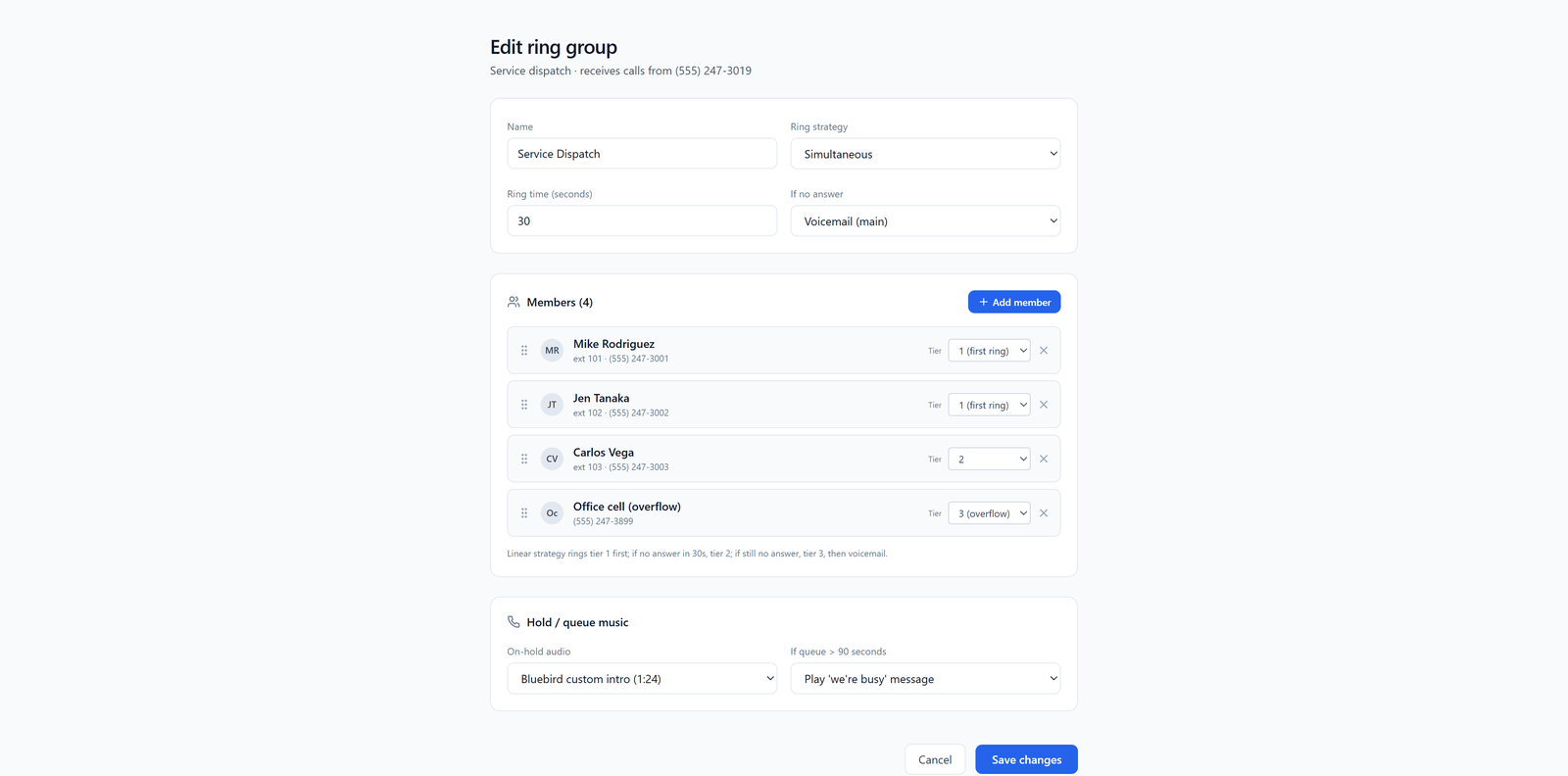
The screenshot above is from when you grow past solo — once you hire your second person, you can ring both phones at once or in sequence, and the one who's free picks up. Worth knowing it's there, but don't worry about it on day one.
What to skip when you're solo
Providers will try to sell you:
- Call center reporting dashboards.
- Multi-level phone menus with sub-menus.
- Video conferencing baked into the phone plan (you already have Zoom or Teams).
- "Unlimited" international minutes you'll never use.
- 50-seat licenses at a discount.
Pick the smallest plan that gives you a number, transcripts, a mobile app, and the ability to add one or two people later without re-doing everything. Check the pricing page before you commit — if you can't tell what a single line costs in under 30 seconds, that's a red flag about the whole company.
A setup that works on day one
Here's a setup you can have running in an afternoon:
- Pick a business number in your area code. Forward it to your cell during work hours.
- Set a short greeting: "Hi, you've reached [Business]. Leave a quick message and I'll text you back within the hour."
- Turn on voicemail-to-text so every message lands in your inbox or texts.
- Turn on auto-reply by text for missed calls: "Sorry I missed you — what's this about and I'll get back to you shortly." If you're not sure how bad your missed call problem actually is, here's how to measure your missed call rate and plug the leak.
- Install the mobile app and sign in. Make a test call from your personal phone to your business number to make sure it all works.
That's the whole thing. You're now screening calls without being rude, capturing every lead, and free to do actual work.
What to do next
Don't overthink the provider choice. The features that matter — a business number, voicemail transcripts, mobile app, two-way texting — are table stakes at any serious provider. Pick one that's priced for a one-person shop today and won't punish you when you hire your third employee. Read the pricing page carefully, try the mobile app for a week, and move on.
The goal isn't a perfect phone system. It's getting your day back.